 OmniFlow
/01
Open the command center.
Search pages and actions, then run the right command without memorizing every shortcut.
EVERY ACTION, SEARCHABLE
Cmd / AltK
BUILT FOR THE SUPPORT DESK
Your everyday support tasks, with fewer steps. OmniFlow brings shortcuts, request helpers, and ready-to-copy details into the tools you already use.
Chrome extension · For supported internal dashboards
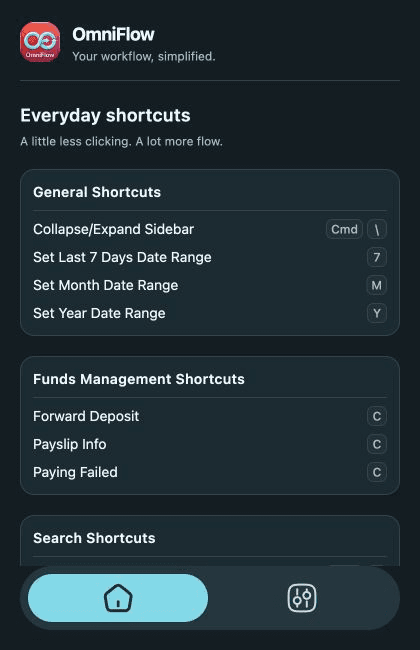
NEW · COMMAND CENTER
Open OmniFlow from anywhere on a supported page. Search actions and destinations, see what is available, and run the next step without leaving the keyboard.
Find pages, profile tools, copy actions, and date filters.
Move with the arrow keys, press Enter to run, Esc to close.
Context-aware states show which actions are ready on the current page.
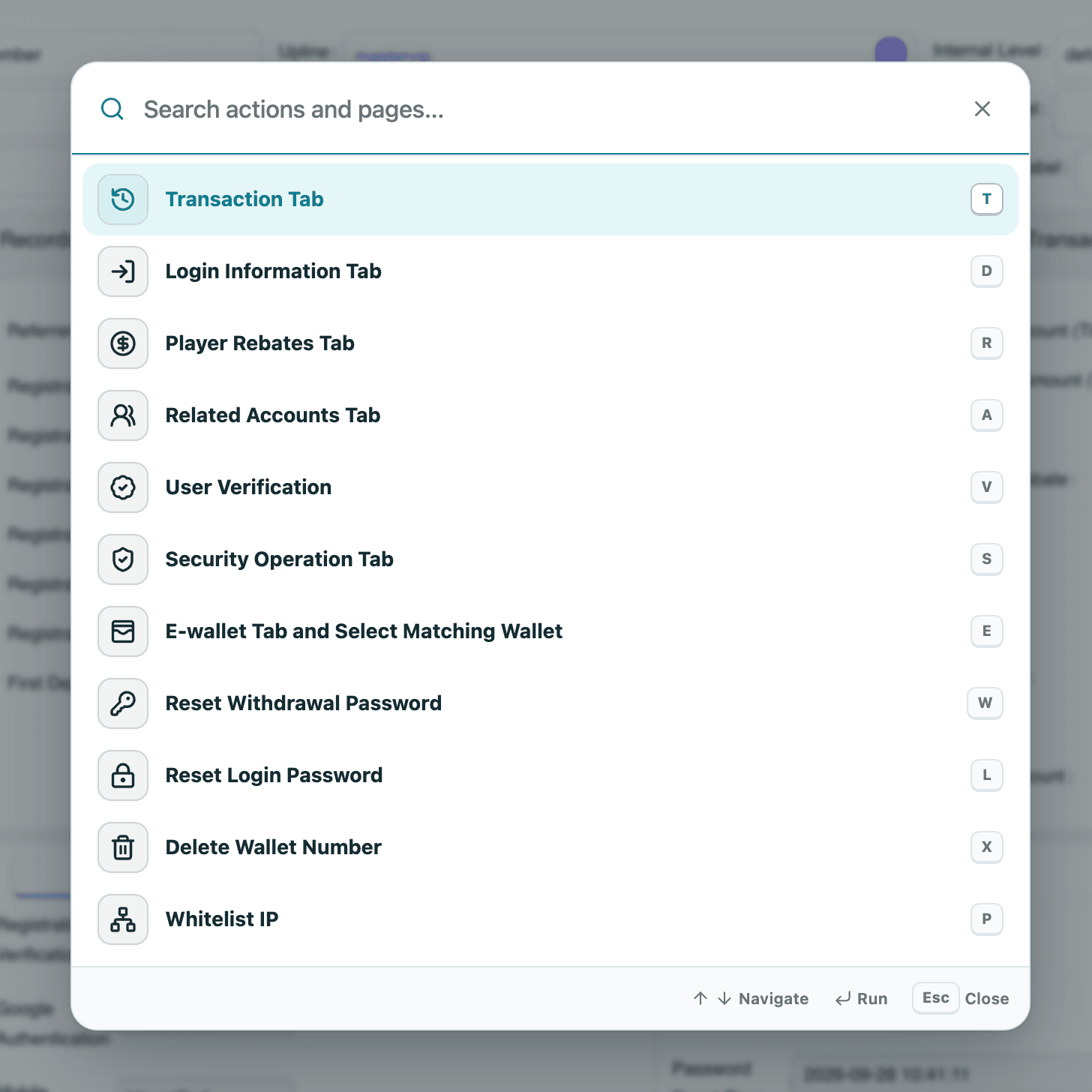
Switch the site theme to preview both versions.
SMALL ACTIONS. A BETTER WORKDAY.
No new workspace to manage. Just useful tools for the tasks you do again and again.
Search pages and actions, then run the right command without memorizing every shortcut.
Collect the details for password reset and wallet deletion requests without rebuilding the message each time.
Bring the relevant account and IP information together into a formatted whitelist request.
Extract and format payslip, deposit, and transaction details for your next support message.
Shortcuts are contextual: available actions depend on the supported page you’re viewing.
WORK THE WAY YOU KNOW
Keep your tools and your process.
Give the repetitive parts a shortcut.
Open a supported internal dashboard. OmniFlow brings its tools alongside your existing workflow.
Use a contextual shortcut or an on-page action to navigate, gather details, or prepare a request.
Check the prepared information, then use it in your support process. You stay in control of the handoff.
FROM THE SUPPORT TEAM
Hear from the people using the extension in their everyday support workflows.
It was very helpful, especially for handling passwords. It made the process much faster and easier. Also, whenever there was a transaction, I just had to press “T” to open it, and the time was automatically set, which saved a lot of time. Overall, it was a very useful and convenient productivity tool.
Hashim Maqbool
Team Lead of Customer Support
I've used your TCG extension, and I've found it really helpful. It makes it much easier to find solutions quickly, which can save a lot of time and help CSRs resolve customer issues more promptly. Overall, it's a very useful tool and definitely makes the support process more efficient.
Zeeshan Khan
Sr. CSR
Saves lot of time. Before this, tasks take so much time by manually writing formats setting times and other things but this extension made it super easy just in a single click and done. So I would really appreciate the efforts of the developers who made this for the ease of users.
Huzaifa Iftikhar
Sr. CSR
LET’S GET YOU IN THE FLOW
OmniFlow is currently distributed directly to internal teams. Email us to request the current build and access details.
Email us to request the current extension ZIP. Extract it to a folder you’ll keep on your computer.
In Chrome, open chrome://extensions and turn on Developer mode in the top-right corner.
Choose Load unpacked and select the extracted folder containing manifest.json. Then open a supported dashboard.
Copy the address, then email us for the current build.
Already installed? Your maintainer can provide the latest build and update instructions.
A FEW MORE DETAILS
OmniFlow is built for customer support agents using supported internal dashboards. Its shortcuts and helpers are tailored to those workflows.
No. On-page actions run only on the supported dashboard domains configured in the extension. Available shortcuts also depend on the page you're using.
Use the Copy email to request access button above, paste the address into your email app, and request the current ZIP. Then follow the installation steps. The current installation process uses Chrome's Load unpacked option.
The request helpers prepare formatted information for you to review and use in your existing support process. Preparing a request does not replace reviewing and submitting it through the appropriate channel.
Yes. Open Preferences in the extension to choose a light or dark theme, configure action sounds and volume, and choose whether to include a phone number in supported outputs.